

Scaling your business
Growing without a plan can lead to overspending in order to keep up with rapid growth, ultimately decreasing the profitability of your business. Let’s start by reviewing business growth and scalability, and what you can do to efficiently scale your business.

Growth
As revenue increases, costs may increase too. For example, you might need to hire more team members to manage your business inbox as you accumulate new customers. While this allows you to serve more customers, your expenses will grow alongside your revenue, which can limit profit and inhibit future growth.
Scalability
Scaling your business means that revenue increases faster than costs increase, resulting in higher profits. If you can maintain your team size while taking on additional customers and continuing to handle day-to-day operations — for example, by using messaging tools — then your profits will increase while costs remain stable.
Now that we understand scalability, let’s go over some of the ways you can effectively scale your business without sacrificing customer satisfaction.
Set growth strategies in place to scale your business effectively
Organize your inbox now
Using the WhatsApp Business app allows you to have a separate inbox for business and personal messages. As your business grows, this will help you keep track of customer conversations and allow you to focus on business when you’re working.
Additionally, setting up customer lists and using customer notes will help you keep track of different conversations. Getting organized now means that as you grow, you’ll know where to find important conversations.
Write responses to your frequently asked questions
What questions do you find yourself responding to over and over again? Create a list of these and write down prepared responses. Doing so will help you save time in a number of ways. First, you can add an FAQ page to your website, and link customers directly to this if they have questions.
You can also use the FAQ responses in automated messages. Let’s go into the ways you can do that to help save time and enhance customer satisfaction with your business.

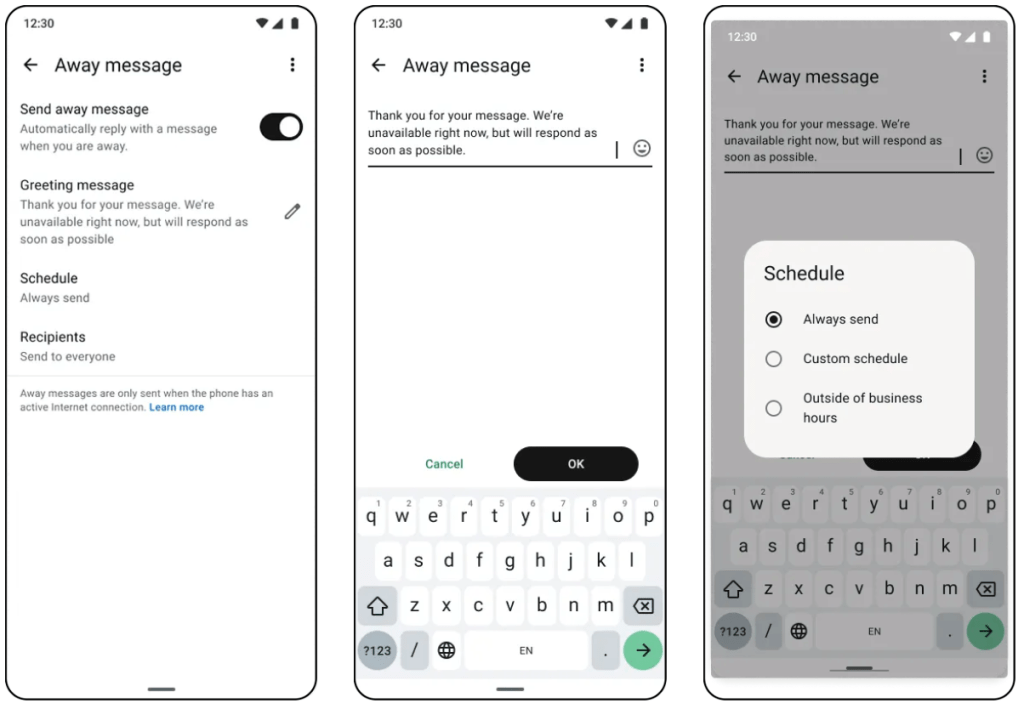
Use automated messages to reply quickly, anytime
You can use your FAQs as pre-saved quick replies to easily respond when a customer asks a common question. You can also set up greeting and away messages to let customers know when you’re away from your inbox and that you’ll be back to answer their questions shortly. A greeting message can help customers feel welcomed by your business.
You can also link directly to your FAQs page (if you have one) in your greeting message, so customers can browse while they wait for you to reply. There is also a way to respond and ensure your customers get their questions answered 24/7. Let’s explore what Meta Business Agent can do for your business.
Let Meta Business Agent act as your new sales concierge
As a business owner, keeping up with customer questions can be difficult. With Meta Business Agent*, you can teach your AI agent to respond to customer questions and keep the conversation going, so you can focus your attention on closing sales and building long-lasting customer relationships.
Your FAQs and pre-saved replies can be used to guide the AI agent, so you know conversations will be in your voice. Meta Business Agent is able to provide immediate, friendly responses, allowing you to know your inbox is handled at all times, even if you’re asleep, at a movie theater, or speaking with customers in person.
*Currently available to eligible businesses in select markets, with additional markets launching soon.