

Build trust with a professional business presence
Before a customer messages you, they’ll want to make sure they’re engaging with a real business account. Improve trust with a clear, complete WhatsApp presence. This makes it easier for people to feel confident starting a chat and following through to purchase.
Tools that help
- Business profile: Add key details like your hours, location, website, contact information and a helpful catalog so customers know they’re chatting with the right business.
- Meta Verified (where available): A verified badge can help build confidence with new audiences and protect your brand presence.
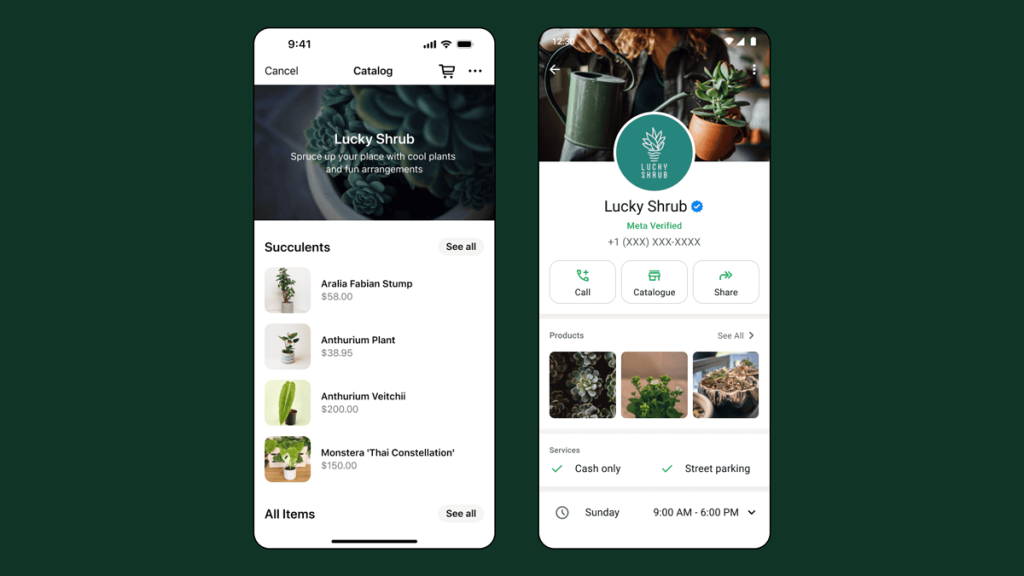
Business goal this supports: When your profile looks legitimate and up to date, more customers feel comfortable messaging you, especially first-time buyers.
Bring in new customers (and better leads) with ads that click to WhatsApp
For many small businesses, discovery happens on Facebook or Instagram, while sales and customer questions happen on WhatsApp. Ads that click to WhatsApp connect those two moments, turning attention into real conversations.
Tools that help
Ads that click to WhatsApp
Ads that click to WhatsApp run across Meta surfaces. When someone taps your ad, it opens a WhatsApp chat with your business so they can ask questions, request a quote, or book an appointment.
Business goal this supports: New customer acquisition and more inbound leads.
Lead optimization for ads that click to WhatsApp
Every conversation is different. Some people message out of curiosity; others are ready to make a purchase. Lead optimization for ads that click to WhatsApp helps eligible advertisers generate higher-quality leads. It helps optimize ad delivery toward people more likely to become real leads, not just start a chat.
Business goal this supports: Achieve better lead quality and lower cost per lead.
Best Practices
- Be specific in your ad message: Name what you sell, who it’s for, and what the customer gets by messaging (quote, availability, booking, recommendation).
- Offer a clear “first question”: For example, “Message us to get today’s price,” “Send your size for recommendations,” or “Chat to book your slot.”
- Respond quickly (or automate the first reply): The faster the first response, the higher the chance the conversation turns into a sale.
Turn more conversations into sales with faster replies (even when you’re busy)
Many small businesses lose sales for one simple reason: they can’t reply instantly, especially during busy hours. The WhatsApp Business app has tools that help you stay consistent without needing to be online 24/7.
Tools that help
- Meta Business Agent (where available): Replies instantly to messages, keeping your business running 24/7. It requests customer information and delivers timely, personalized support to drive sales, even when you’re busy.
- Automated messages:
- Greeting messages: Automatically welcome first-time customers (or customers returning after a pause) so no inquiry goes unanswered.
- Away messages: Set expectations when you’re unavailable (“We’ll reply tomorrow morning”) so customers don’t feel ignored.
- Quick replies: Save common answers (pricing, hours, address, delivery info) and send them instantly.
- Lists: Organize chats (e.g., “New lead,” “Pending payment,” “Order complete,” “VIP”) so follow-ups don’t fall through the cracks.
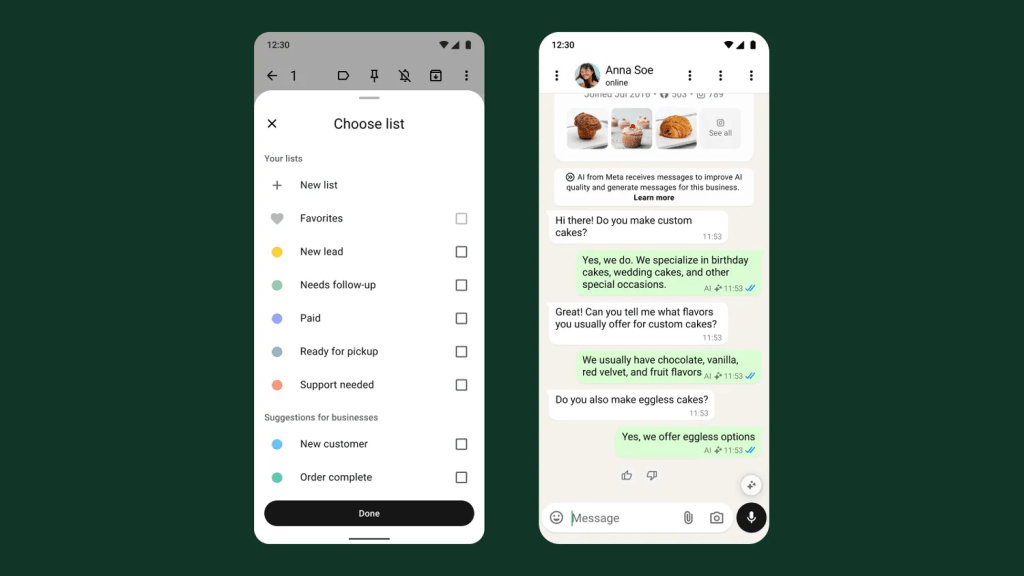
Business goal this supports: Faster responses, a better customer experience, and more conversions from the same number of inquiries.
Improve lead quality and shorten the path to purchase with website to WhatsApp ads
Many small businesses lose sales for one simple reason: they can’t reply instantly, especially during busy hours. The WhatsApp Business app has tools that help you stay consistent without needing to be online 24/7.
Tools that help
Website to WhatsApp ads help by combining the strengths of a website landing page (information + intent), and WhatsApp (fast, personal follow-up).
- How it works: A customer first sees an ad on their phone, while browsing Facebook or Instagram, and from there they’ll be directed to your website. They can check out your website to understand the essentials, then tap into WhatsApp to ask a specific question, confirm next steps, or request a quote. Learn more here.
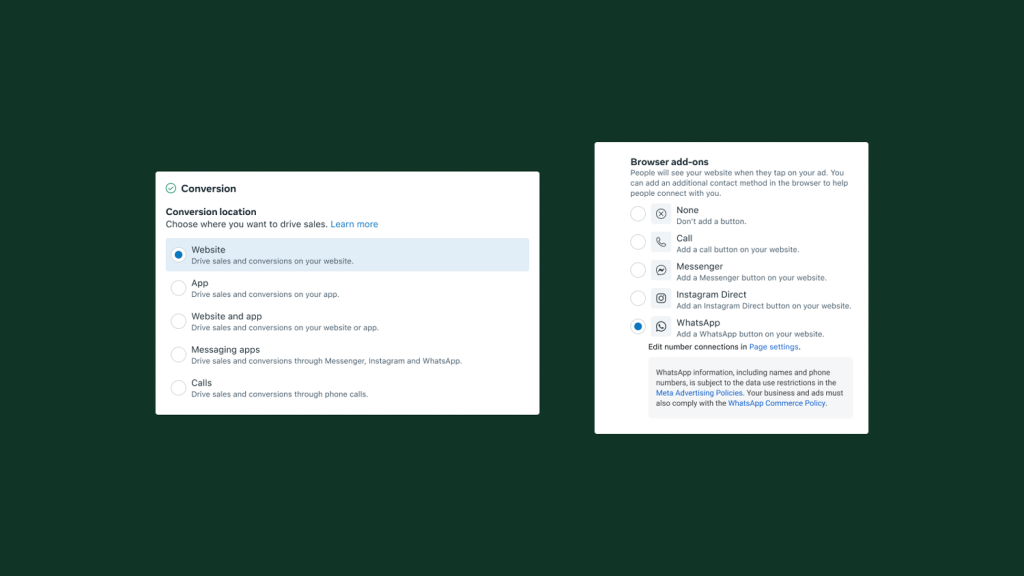
Business goal this supports: Better lead quality and more efficient conversions through chat—especially in WhatsApp-heavy markets.
How this helps small businesses
- Higher-intent conversations: Customers arrive in WhatsApp after they’ve already seen key details—reducing low-intent “just browsing” chats.
- Less back-and-forth: Your team spends less time answering basic questions that could have been handled on the page.
- Strong option for considered purchases/services: Especially helpful when customers want a human response before buying.
Examples
- Salon or spa: Landing page shows services, pricing, and examples → WhatsApp handles booking, follow-ups, and reminders.
- Retailer: Landing page highlights best-sellers and policies → WhatsApp answers product questions and helps close the sale.
Re-engage customers and drive repeat purchases with business broadcasts
Growth isn’t only about finding new customers—it’s also about bringing past customers back. WhatsApp is built for repeat business because conversations feel personal and direct.
Tools that help
- Business broadcasts: help you reach the right customers at the right time without manually sending the same message one by one.
- Send targeted, one-to-one messages to specific customer groups (for example: customers who recently contacted you or customers tagged with a label).
- Use performance insights (like reads and replies) to learn what works—and improve the next message.
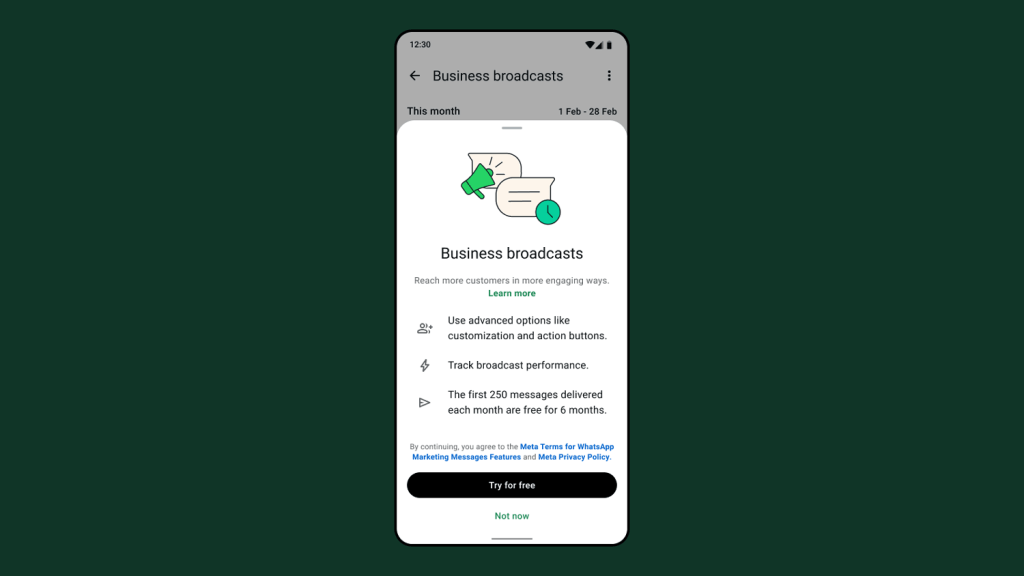
Business goal this supports: Encourage repeat business, higher retention, and stronger customer relationships.
Tip: Start with one simple use case:
- Update customers on holiday sales
- Automate appointment reminders
- Send birthday greetings
Remember to always keep your messages relevant and respectful of your customers’ messaging preferences.
WhatsApp Business App Resources
Learn all the ways you can build deeper relationships and drive value for your business across the customer journey using the WhatsApp Business app.