

You can’t be everywhere at once
If you run a small business, you already know: customers message at all hours. Questions about pricing. Requests for appointments. “Are you open tomorrow?” And if you don’t reply fast, they move on.
Time spent answering the same five questions is time you’re not spending on production, developing new products, or giving your highest-value clients the attention they deserve.
The good news? You don’t have to choose between repetitive tasks and festive plans. With the right setup on WhatsApp Business, you can keep customers happy without answering every single message yourself, allowing you to redirect that energy toward the work that actually moves your business forward.
Here’s how.
1. Get organized: Know what your customers actually ask
Before you try to save time, figure out where your time is going.
Look at your last week of messages. You’ll probably notice most of them fall into a few buckets:
- “How much does _____ cost?”
- “Are you available on _____?”
- “Do you deliver to _____?”
- “What are your hours?”
Why this matters: Once you know the patterns, you can set up quick replies, automated greetings, and away messages that handle these for you. No more typing the same answer 15 times a day. That’s more time to focus on production, custom orders, or nurturing your most valuable client relationships.
Try this today: Write down your 5 most-asked questions. Then create a saved quick reply for each one on WhatsApp Business.
2. Set up your business for busy seasons before they happen
The worst time to organize your messaging is when you’re already swamped. A little prep goes a long way, and the payoff isn’t just fewer messages to answer. It’s more capacity to focus on what actually grows your business.
Keep your business info up to date
Customers check your profile before they message. Make sure they can find:
- Your current hours (especially seasonal hours)
- What you sell or what services you offer
- Your location or delivery area
- How to book or order
If this info is easy to find, you’ll get fewer “basic info” questions and more messages from people ready to buy.
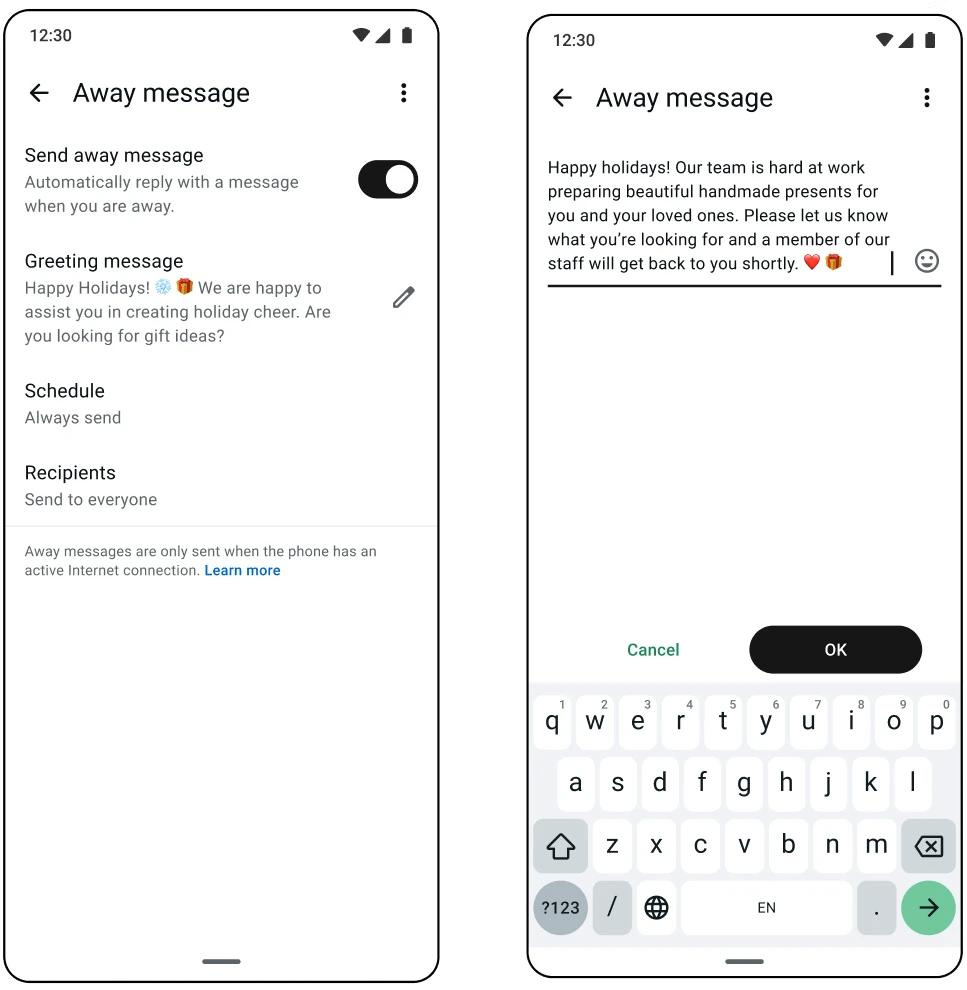
Set an away message that actually helps
Instead of just “We’re closed, we’ll get back to you,” try something like:
“Thanks for reaching out! We’re currently closed but will reply first thing tomorrow. In the meantime, here’s our menu/price list/booking link: catalog link”
A helpful away message keeps the conversation going even when you’re not there.
Plan ahead for your busiest weeks
To prepare for the busy season:
- Update your catalog and hours a week early
- Prepare answers for seasonal questions (shipping deadlines, gift options, returns)
- Let customers know your response times may be longer, and give them self-serve options
The goal: handle the volume so you can protect time for higher-touch client work and behind-the-scenes production that keeps your business running.
3. Time-saving tips that add up fast
These are small changes that save you hours every week. Hours you can put back into the parts of your business that need your personal attention, like production, fulfillment, or building relationships with your top clients.
Don’t start from scratch every time
Use lists to organize your chats (new customers, pending orders, follow-ups). Use quick replies for your most common answers. Take notes on customer preferences and regularly update your product catalog so you can stay organized and share items in one tap instead of explaining them from scratch.
Batch your replies instead of reacting all day
You don’t need to respond the second a message comes in. Try this rhythm:
- Morning: Reply to overnight messages and follow up on anything urgent
- Midday: Quick check for new inquiries
- End of day: Wrap up any open conversations
Three focused check-ins are often more effective than being glued to notifications all day. The time between? That’s for production, creating, and the work only you can do.
Let your greeting message do the first job
Your automated greeting is the first thing a new customer sees. Make it work hard:
- Welcome them warmly
- Tell them what to expect (“We usually reply within an hour”)
- Point them to something useful right away (your catalog, booking link, or FAQ)
That first message buys you time and makes a great impression.
4. Let an AI agent help you handle the rush
As your business grows, Meta Business Agent can handle customer questions so you can focus on the conversations that really need you and the business activities that drive real growth.
What your AI agent can do for you:
- Answer common questions instantly, even at midnight or on a day off
- Greet new customers and point them in the right direction so no one feels ignored
- Help customers find products, check availability, or book appointments without you lifting a finger
- Flag important conversations for you so you know where to spend your time
What to keep for yourself:
- Sensitive complaints or frustrated customers
- Big orders or VIP clients who want a personal touch
- Any conversation where a human connection makes the difference
- Time for production, product development, and strategic planning
Free yourself up for higher-value work this season
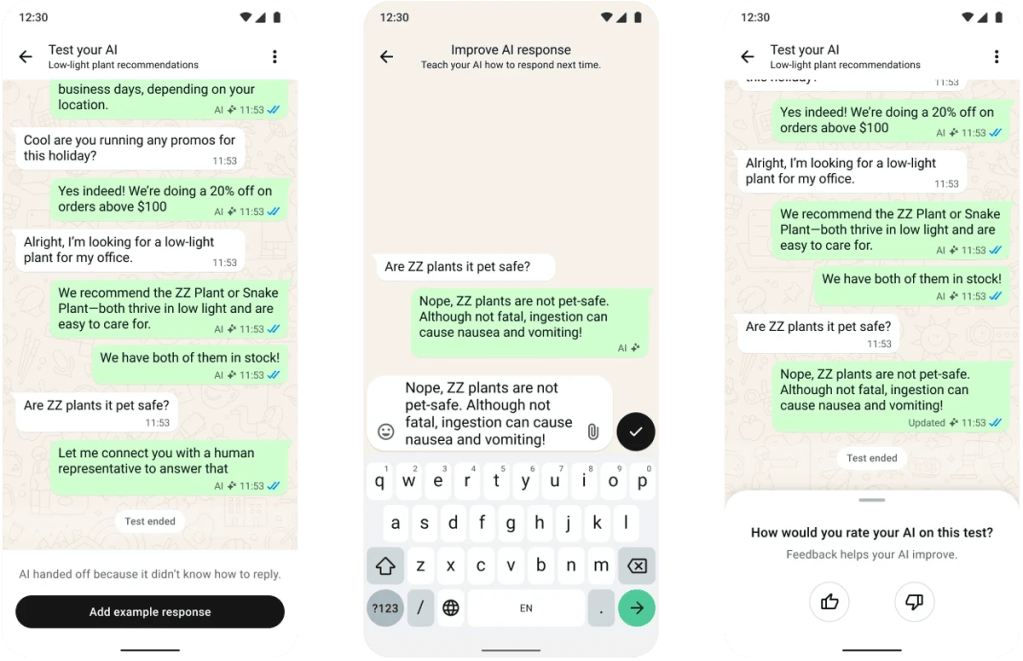
With Meta Business Agent handling your inbox, you stay in control, set the tone, and step in when it matters. Meanwhile, you’ve freed up hours to focus on what actually grows your business, whether that’s perfecting your product, managing production, or giving your best clients the white-glove experience that keeps them coming back.
The bottom line
You started your business because you’re good at what you do, not because you love answering the same five questions all day. With the busy season approaching, now’s a great time to help your business grow without sacrificing other important elements. With a little setup and the right tools, you can:
- Respond to customers faster (even when you’re off the clock)
- Stop losing leads to slow replies
- Free up real time for production, product development, and higher-touch client relationships
- Actually enjoy your busiest season instead of just surviving it
Your customers get great service. You get your time back, and you get to spend it where it matters most: growing your business. That’s a win.